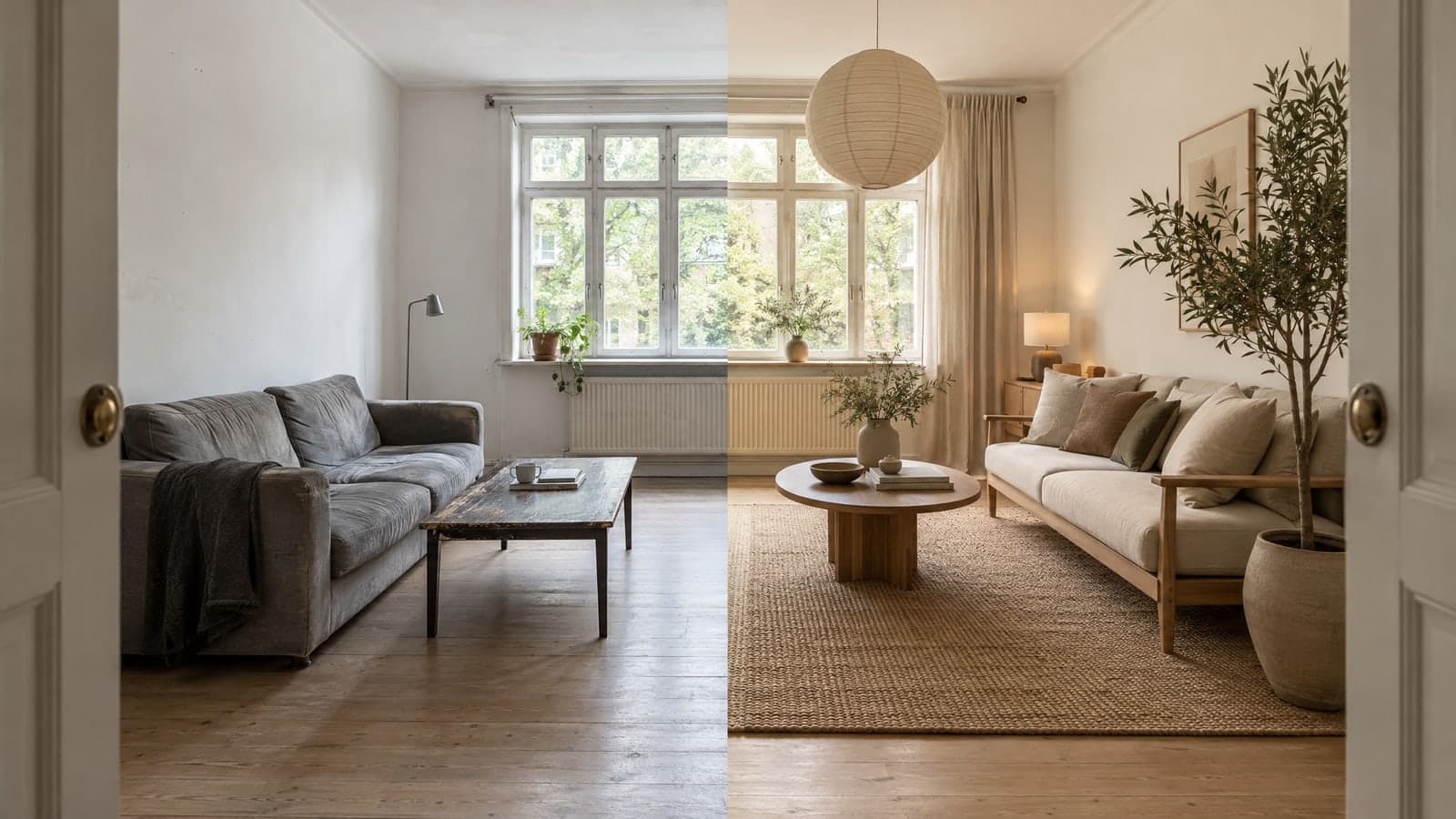
Best AI for Interior Design: How to Pick a Tool That Works on Your Real Room
The best AI for interior design is the one that redesigns your room, not a showroom that only looks a bit like it. Plenty of apps can produce a pretty picture. Far fewer keep your windows where they are, respect the size of your space, and let you fix the one piece you don't like. If you want to skip ahead and try it, AI room design from your own photo takes a few seconds. If you'd rather choose carefully, here's how.
What "Best" Actually Means for AI Interior Design
Many roundups of the best AI home design apps rank tools by how impressive their sample images look. That's the wrong test. Sample images are hand-picked. What matters is what a tool does with an ordinary photo of an ordinary room: slightly crooked, a little dim, with a radiator under the window.
A good tool should pass four checks:
- It starts from your photo. Ideas generated from scratch can't tell you whether a sectional fits your wall.
- It keeps the room's structure. Walls, windows, doors, ceiling, and camera angle should stay put. Only furniture, colors, materials, lighting, and decor should change.
- It lets you edit one thing. If the sofa is wrong but everything else is right, you shouldn't have to roll the dice on the whole room again.
- It exports at a usable size. A small preview is fine for browsing. A listing, a client deck, or a printout needs more.
The Four Types of AI Interior Design Tools
Before comparing features, figure out which kind of tool you need. They solve different problems.
Prompt-based image generators
You type a description and get a brand-new image. Great for mood boards and early inspiration. Weak for real decisions, because the room in the picture isn't your room.
Photo-based room redesign tools
You upload a room photo, pick a room type and a style, and get a makeover of that exact space. This is the best AI tool for interior design when your question is "what would my living room look like in Japandi?"
Virtual staging tools
Built for real estate. They furnish empty rooms or replace dated furniture in listing photos so buyers can picture themselves in the space.
Floor plan generators
They work on layout, not decor, turning property details or a sketch into a 2D or 3D plan.
How to Test Any AI Interior Design App in 10 Minutes
Don't trust screenshots. Run the same small test on every tool you're considering:
- Use one real photo. Pick a room you know well, shot in normal daylight from a corner so two walls are visible.
- Pick the same style everywhere. Choose something specific, like Scandinavian or Midcentury Modern, so the results are comparable.
- Check the fixed parts. Did a window move? Did a doorway disappear? Did the ceiling change? Any of these means the result can't guide a real purchase.
- Check scale. Does the new bed look like it fits the floor, or like it would block the closet?
- Try to fix one item. Ask for a different sofa or a new rug, and see whether the rest of the room survives the edit.
- Download the result. Open it full screen and look at edges, textures, and lighting.
The best AI decorating app for you is the one that gets through steps 3 to 5 without a fight.
Features That Separate Good Tools from Great Ones
A style range that fits real homes
A handful of generic presets gets old fast. Roomood offers 19 interior styles, from Modern and Scandinavian to Japandi, Art Deco, French Country, and Cottage Core, so you can compare very different directions on the same photo.
Room types beyond the living room
Kitchens, bathrooms, and home offices need different furniture than bedrooms, so a good tool lets you name the space. Roomood lists 66 room types, from living rooms, kitchens, bathrooms, kids' rooms, and balconies to commercial spaces like coffee shops, offices, and hotel lobbies.
Single-piece replacement
This is the feature most people miss until they need it. With Roomood's furniture replacement, you name the item you want to change, such as the sofa, a lamp, or the wall art, and either describe the new piece or upload a reference photo of it. The layout and everything else in the room stay the same, and the replacement is made to match the room's perspective, lighting, and shadows. It's the fastest way to go from "almost" to "yes." Swap furniture in a room photo to see how it handles your space.
Tools made for specific rooms
A general tool is a good start, but some rooms deserve their own. If you're weighing new cabinets and countertops, an AI kitchen design tool that works from a photo of your kitchen gets you closer to a remodel decision.
High-resolution export
Roomood exports results in 4K, which matters once an image goes into a listing, a presentation, or a printed board.
Match the Tool to Your Project
Homeowners and renters. You want quick ideas you can act on. A photo-based redesign tool with furniture replacement lets you preview a new couch or rug before you buy anything, with no design software to learn and no prompts to master.
Real estate agents and photographers. Your job is listings: empty rooms furnished, dated rooms refreshed, photos ready to publish. AI virtual staging for realtors is built for exactly that, with 4K export and an MLS disclosure label included.
Interior designers. You need quick concepts to show clients before you spend hours on a full design. Starting from the client's own photo makes the conversation concrete, and designs made with Roomood can be used commercially, including in client proposals.
A Quick Checklist Before You Commit
- Does it work from your own photo?
- Did the windows, doors, and walls stay where they were?
- Can you replace a single piece of furniture?
- Is there a style that matches your taste, not just "modern"?
- Can you export at a size you'll actually use?
- Does it run in a browser on your phone and laptop, or do you need to install something?
Roomood runs in any browser on iPhone, Android, Mac, or Windows, and your first design preview doesn't require an account.
More Posts
Small Bathroom Ideas: 12 Ways to Make a Tiny Bathroom Feel Bigger
Twelve practical small bathroom ideas for layout, tile, lighting, and storage, plus how to preview them on a photo of your own bathroom.

How to Redesign a Room with AI: From Photo to Finished Makeover
A step-by-step guide to redesigning any room with AI: photo tips, room types, style selection, and refining results with furniture replacement.

AI Furniture Replacement: Swap the Sofa Without Redoing the Whole Room
How AI furniture replacement works, why it beats regenerating a whole design, and how to preview real furniture in your own room before buying.